
Talent In Cloud
|
Help Center
Product Tour
Schedule a Demo

We run on Intercom
Go To Talent In Cloud

Written By Saroj
Updated over a week ago
Talent In Cloud allows you to coordinate with your recruiting team to have discussions about the candidates as well as assign tasks to them.
1. Go to the desired candidate profile
2. Click on Comments
3. Write your comment in the given text area. You can also apply some formatting to your comment
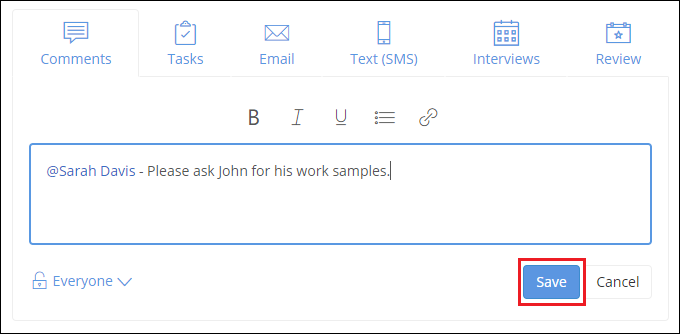
4. In addition to this, you can also mention your team member in your comment. This will notify them about the same and help you in catching their attention. Type '@' followed by the name of your team member. Talent In Cloud will also suggest you names of your team members. Choose the desired name by simply clicking on it
5. You can set visibility permissions on your comments as well. Click on the drop-down on the left corner of Comments tab and choose the desired option
6. Click on Save button
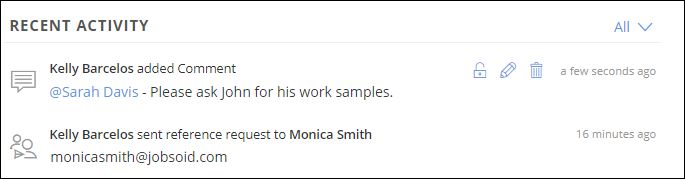
Your comment will be saved and added to the RECENT ACTIVITY immediately. The concerned team member will receive a notification (Read: How to manage Notifications and Frequency) about the same.
5. Add a comment for your review if you wish to. Make use of formatting options on the text editor and present your comment in a neatly formatted layout
6. Vote your candidate accordingly - Definitely yes, yes, no, definitely no and not sure
7. Set the visibility permissions to your review if required
8. Click on Submit button and save your review
Did this answer your question?